Santa Clarita Valley Center for Photography
(661) 904-2092
  • Home
  • Workshop Schedule
  • Our Team
  • Portfolio
    • Events
    • Headshots
    • Portraits
    • Products
    • Real Estate
  • Resource Links
    • Terms & Conditions
  • Blog
  • Contact Us

Tip of the Week: Depth of Field

By admin · Comments (0) · Monday, February 1st, 2010

When photographing a subject that is somewhat close, a lot of times the subject can appear flat or boring, especially if you have zoomed in to fill the frame.

To add interest to the photography, include an object  in the foreground to enhance the sense of depth.  This leads the viewer’s eye around and through the scene, from the foreground to the subject in the distance.

For more Basic Camera information, attend our Basic DSLR Camera workshop on Saturday, February 6, 2010.
Categories : News and Press Releases, Photo Tips, Popular, Weekly Tips
Tags : Photography, Tips

Tip of the Week: Digital Cameras and Cold Weather…

By admin · Comments (0) · Monday, January 25th, 2010

As winter is truly upon us, one must remember that when we  bring a digital camera from cold weather into a warm house, car or hotel this can cause problems.  When you bring a cold camera indoors, there is the possibility of condensation forming.  One way to help that, is to wrap your camera gear in a towel, and let the equipment come up to room temperature.  The towel will absorb the moisture, and thus assisting in the reduction of possible condensation.  There are several different ways or schools of thought regarding how to prevent condensation, but find the method that works best for you and your situation.

Categories : News and Press Releases, Photo Tips, Popular, Weekly Tips
Tags : Tips

Using a Two-Light Setup for Studio Portrait Photography

By admin · Comments (4) · Wednesday, January 20th, 2010

Today we are pleased to post a guest blog entry by instructor David Saffir on Two-Light Portrait Photography.

Studio lighting can be quite simple, or complex. Beginner or seasoned pro, lighting can be a matter of personal style, equipment on hand, time constraints, or other factors.

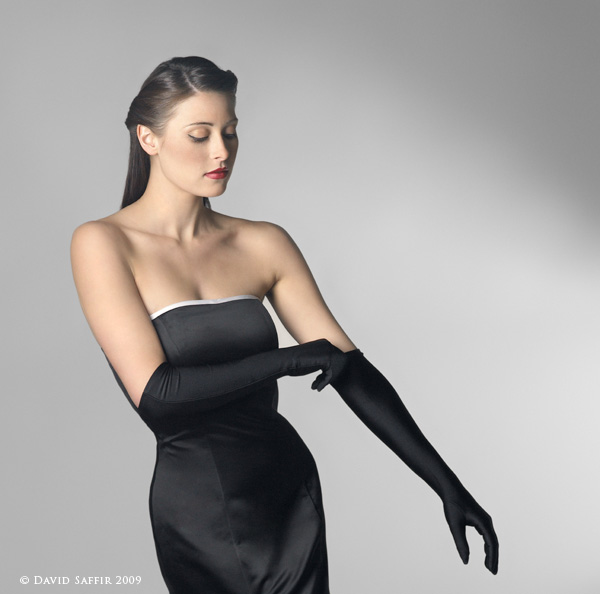
I recently photographed Sarah Muldorfer, a model from our area at the SCV Center for Photography. We had started out with a multi-light, high-key setup. Once that was completed, I wanted to switch to a simpler look that emphasized her elegant dress, long hair, and long limbs. Her position on the set is about 6-8 feet in front of the backdrop.

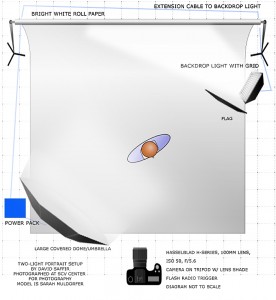
Look at the lighting diagram. There is one primary light, a large umbrella/soft box located camera left, with its center approximately the same level, or a bit higher, than the lens axis. The umbrella is covered with a diffuser.


diagram muldorfer gown saffir finalr3 copy (2) 


The second light is also a strobe, set up with small reflector and a barn door. It was used to create a “spotlight” effect on the white background.  The light is aimed nearly parallel to the background, and was set to low intensity relative to the main light to create the  effect.

Normally I place a flag – such as a piece of foamcore – between a light and the camera to keep the image clean. Also, shooting an image like this with limited lighting pretty much requires that you eliminate ambient lighting – any source can cause issues – including an open door or window, other studio lights, etc.

I often mount the camera on a Gitzo tripod w/ ball head during a shoot. This is a rock-solid setup that works well during shoots where camera position changes fairly frequently. However, Sarah was experimenting with some different poses, and I took the shot hand held, almost as a candid. Exposure was f/8 @ 1/100, ISO 50, 100mm lens (medium format). If that shutter speed seems slow to you, remember that the strobes are firing at a speed of at least 1/1000!

Exposure is very important in this type of shot. If overexposed, detail in the model’s fair skin would be lost. If underexposed, the shadow/highlight transitions, particularly on her skin, would at best be noisy and at worst show a mix of color aliasing and artifacts.  I used a hand-held meter to measure exposure. (note: always point the meter into the lens of the camera, not the light. Meter position is usually just under the chin of the subject.)  Underexposure would also reduce, or eliminate details in her black dress.

Last, her pose turns most of her body toward the light. The umbrella-diffuser combination gives a wonderfully soft light, which still brings up the details. Her nose does not “break the line” of her cheek, and since she was moving when the shot was taken she looks relaxed and natural.  I think this was the shot of the day, and she was very please with it.

 s9232saffirmelblog 


For more on Two Light Portrait Lighting, join us on Thursday, January 21st for our Classic Two Light Portrait workshop from 6:30pm to 9:30pm.  Call for enrollment information as class size is limited.

Categories : News and Press Releases, Photo Tips, Popular, Weekly Tips
Tags : Fashion, Lighting, Lighting Rentals, Portraits, SCV Center for Photography, Studio, studio rentals, workshops

Tip of the Week: Lightroom Sorting

By admin · Comments (0) · Monday, January 18th, 2010

Did you know you can sort your photos in Lightroom by Edit Time?  In the Library Module there is a very useful sort option called Edit Time.  Sorting the grid view by Edit Time will display the thumbnails with the most recent ones at the top of the grid.

This is an easy way to select all of the photos that have had any form of editing applied.  Note that adding keywords counts as editing.

For more information, sign-up for our Lightroom workshop on January 19, 2010 from 6:30pm to 9:30pm.

Categories : News and Press Releases, Photo Tips, Popular, Weekly Tips
Tags : Lightroom, Tips

Tip of the Week:Did you know…..

By admin · Comments (0) · Monday, January 11th, 2010

You hear a lot about the power of Adobe Camera RAW (ACR), but did you know you don’t have to shoot RAW to you use it? You can also open JPEG and TIFF files. Simply open Adobe Bridge, select the image you want to open in Adobe Camera RAW, then select “Open in Camera RAW…” from the file menu. (You can also press Ctrl-R in Windows or Cmd-R on a Mac.) You get all the non-destructive editing power of ACR, on your non-RAW images!

For more Photoshop ideas, sign up for our Photoshop 101 workshop series with David Green starting on Wednesday, February 13, 2010.

Categories : Photo Tips, Popular, Upcoming Events, Weekly Tips
Tags : CS4, Photoshop, Tips

Tip of the Week: Use NiMH Batteries in your flash

By admin · Comments (0) · Tuesday, January 5th, 2010

If you use your off-camera flash a lot your going to go through batteries, so try using nickel-metal hydride (NiMH) rechargeable batteries.  They recycle faster than alkaline batteries and you can recharge them quickly.

For more Flash tips and learning, sign up for our “Basics of Camera Flash” with Ron Brewer on Thursday, January 7th from 6:30pm to 9:30pm.

Categories : Photo Tips, Popular, Upcoming Events, Weekly Tips
Tags : flash, Off-Camera Flash, workshops

Special workshop Deal

By admin · Comments (0) · Tuesday, January 5th, 2010

Special offer:

If you attend our “Tools of the Trade, taking your Photography and business to the Next Level” workshop this Saturday, and you bring a friend, you may qualify for a 25% discount for each of you.

Here’s the catch: one of you has to be a first-timer attending a session at the SCV Center for Photography.  Cost is $109 before discount.

Workshop agenda:

Designed for aspiring professionals, serious amateurs, and pros alike, this session tackles several topics important to success in today’s environment.

Morning Session: Studio Planning & Set-up.

Physical Environment and Ergonomics, Lighting.

Display/Monitor Selection.

Discover the latest software and hardware the pros use to manage workflow and achieve consistent results.

Getting the Most Out of Your Inkjet Printer:

Camera to printer workflow, selecting a printer, accurate color previews, printing from image editing software, successfully wrestling those pesky printer dialogues into line, media selection, printer troubleshooting, print correction, archiving.

Lunch: on your own

Afternoon Sessions: Fine Art Printmaking

Create Fine Art and Decor Prints for other photographers and galleries. Learn price points, media types, how to work with galleries and organizations, Fine Art Reproduction, etc.

Fine Art Media for Limited Editions, Matching Media and Client Needs, Media Types for Social Photography/Commercial/Fine Art/Other Purposes Q&A & Printing.   If time permits, we will make a few prints from student’s files.

Categories : News and Press Releases
Tags : Creative Photography, Photography, Printer, SCV Center for Photography, workshops

Award Winning Images

By admin · Comments (0) · Wednesday, December 2nd, 2009

The SCV Center for Photography had a very successful print competition at the Santa Clarita Photography Associations’ Fall event.  Karen Carll won a 3rd place for her Geber Daisy, Mel Carll won a 2nd place fro his HDR Pa louse Truck and 3rd place for his HDR Barber Shop.  Instructor David Green also had a 2nd place photo.  The big winner was instructor Ted Dayton who won Best in Show, Judge’s Choice and two 1st place images and a 2nd place.   We look forward to seeing you in the studio learning from our award winning instructors.

Palouse truck web

Categories : News and Press Releases, Popular
Tags : Creative Photography, HDR, Karen Carll, Mel Carll, Photography, Photomatix, SCV Center for Photography

December 2009 Workshop Calendar Released

By admin · Comments (0) · Tuesday, November 10th, 2009

Check it out.  December 2009 workshop calendar is online.  Lots of great new classes, including Digital Asset Management, Holiday Gifts, Photoshop Elements and Portraits with Ring Flash Live Model Shoot.  Nothing says the gift of photography like a gift certificate to the SCV Center for Photography, good for workshops or studio time.

Categories : News and Press Releases, Popular
Tags : gift certificates, Holiday gifts, Photography, Photoshop Elements, Portraits, SCV Center for Photography, studio rentals, workshops

SCV Center for Photography welcomes Tony Zinnanti Gallery Presentation

By admin · Comments (0) · Friday, November 6th, 2009
Tony Zinnanti Gallery Show

Tony Zinnanti Gallery Show

Photo Center Installation Features Traditional and Antique Photography

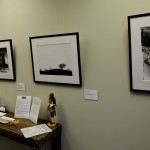
For the month of November, the Santa Clarita Center for Photography will be featuring “Silver Prints: A Survey of Traditional and Antique Photography” by local photographer and instructor, Tony Zinnanti. The installation features prints created from a variety of photographic techniques, including dry plate formulas from the 1800s and negatives produced with Zinnanti’s one hundred year old 8×10 camera.

While the Santa Clarita Valley Center for Photography largely centers around ever advancing digital technology, the center touts its expertise with traditional and fine art processes. Zinnanti’s personal darkroom is a satellite element of the photo center.

The installation, which consists of twelve hand printed black and white photos, features scenes of Santa Clarita, including haunting images of Mentryville cast from glass plate negatives.

The Santa Clarita Center for Photography is open for viewing during regular business hours, on weekends and by appointment.

Tony Zinnanti Gallery Show

Tony Zinnanti Gallery Show


Categories : News and Press Releases, Popular, Upcoming Events
Tags : Los Angeles Photographers, Photography, SCV Center for Photography, Studio, workshops
« Previous Page
Next Page »

Join Our Email List

Register for SCV Center for Photography email updates

Contact Us

We are located at: 27600 Bouquet Cyn Road, Suite 212 Santa Clarita, CA 91350 (661)904-2092 info@scvphotocenter.com
Santa Clarita Valley Center for Photography runs on Builder by iThemes
Copyright © 2025 All Rights Reserved